
One person is thinking about dinner. Another is still at work and will stop at the shop on the way home. Here is how to turn an idea from your AI assistant into a shopping list both people can use.
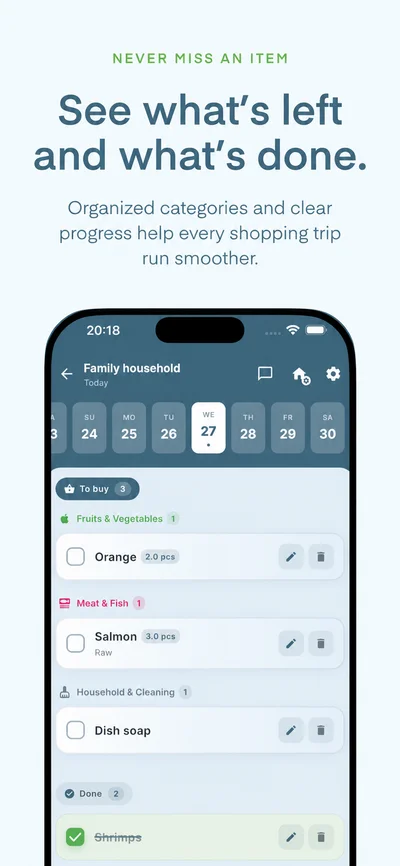
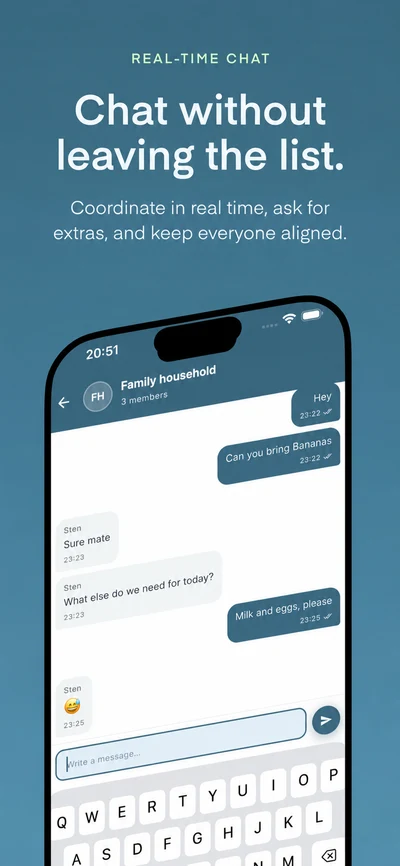
This walkthrough uses an illustrative prompt for salmon rice bowls. The app images below show Cartly’s list and chat views; they are not a recording of this example.
1. Connect your assistant to Cartly+
Create a Cartly+ account, join or create your household, and connect a supported assistant using the AI setup guide. Sign in with the same Cartly+ account you use in the app and review the requested permissions.
AI connections are included in Free. Your assistant provider may require its own subscription or a supported account and region.
2. Decide what you are cooking
Ask for a meal idea first, before adding anything to the list. For example:
Suggest a salmon rice bowl dinner for two, with avocado and cucumber. Show me the ingredients, quantities and cooking steps first. We already have rice, soy sauce and oil.
Review the suggestion and adjust it for your household. Check portions, ingredients, allergies and cooking instructions rather than relying on the first answer.
3. Send the missing ingredients to your shared list
Once you are happy with the recipe, tell the connected assistant which household and shopping date to use:
Add the ingredients we still need to my Cartly+ household’s shopping list for today. Leave out rice, soy sauce and oil. Confirm the household and quantities before adding anything.
If you belong to more than one household, specify the right one. Read the assistant’s result, then open Cartly+ and check the household, date and quantities.
AI additions currently go to By date. Select the same shopping date in the app. Main list is a separate list for groceries without a date. Adding ingredients through an assistant does not automatically save a recipe or create a meal-plan entry.
4. Let the other person pick up the shopping
Your partner opens the same household and date on their phone. They check items off as they go. If the salmon is sold out, household chat keeps the question about a replacement with the people sharing the list.
List updates sync while devices are connected. You can check the list from the web app while someone else shops on iPhone or Android.
What is free?
AI connections, household chat and meal planning are included. Free supports up to two households, 50 checked and unchecked items per date in By date, 50 unchecked Main list items per household, and five saved recipes per household. See Free and Premium details.
Already have a recipe you want to keep?
Save it in Cartly+, plan a meal and add selected ingredients from the recipe. Website recipe import and translation are separate Premium features with daily limits. Eligible subscribers can start a seven-day Premium trial when they need it; it does not start at account registration.
Explore recipes and meal planning or read why Cartly+ was built.